Introducing Pipette: A benchmarking suite for on-device intelligence
Today, in partnership with Artificial Analysis, we release Pipette, an open-source platform for benchmarking foundation models on edge devices. Pipette is built around a simple premise: on-device behavior is a property of the deployed system, not the model in isolation. It turns edge deployment into an empirical systems problem, making the interactions that determine real-world behavior visible and testable.
What is being released today:
- A public dataset of lab-verified results generated under published reproducibility protocols. It contains five on-device performance metrics for more than 1,000 model × quantization × runtime × device × context configurations. The current data spans 30+ models, multiple quantization formats, llama.cpp builds for macOS, iOS, Windows, and Android, and context lengths from 256 to 8,192 tokens. Initial published results cover MacBook Pro with M5 Max, iPhone 17 Pro, and Galaxy S26 Ultra, with AMD Ryzen AI Max+ 395 and Radeon 8060S results coming soon. Explore the coverage details here.
- Open-source benchmark clients for macOS, Windows, iOS, and Android. These include native iOS and Android apps for executing performance benchmarks directly on target devices. Publication of community-submitted results is currently in beta.
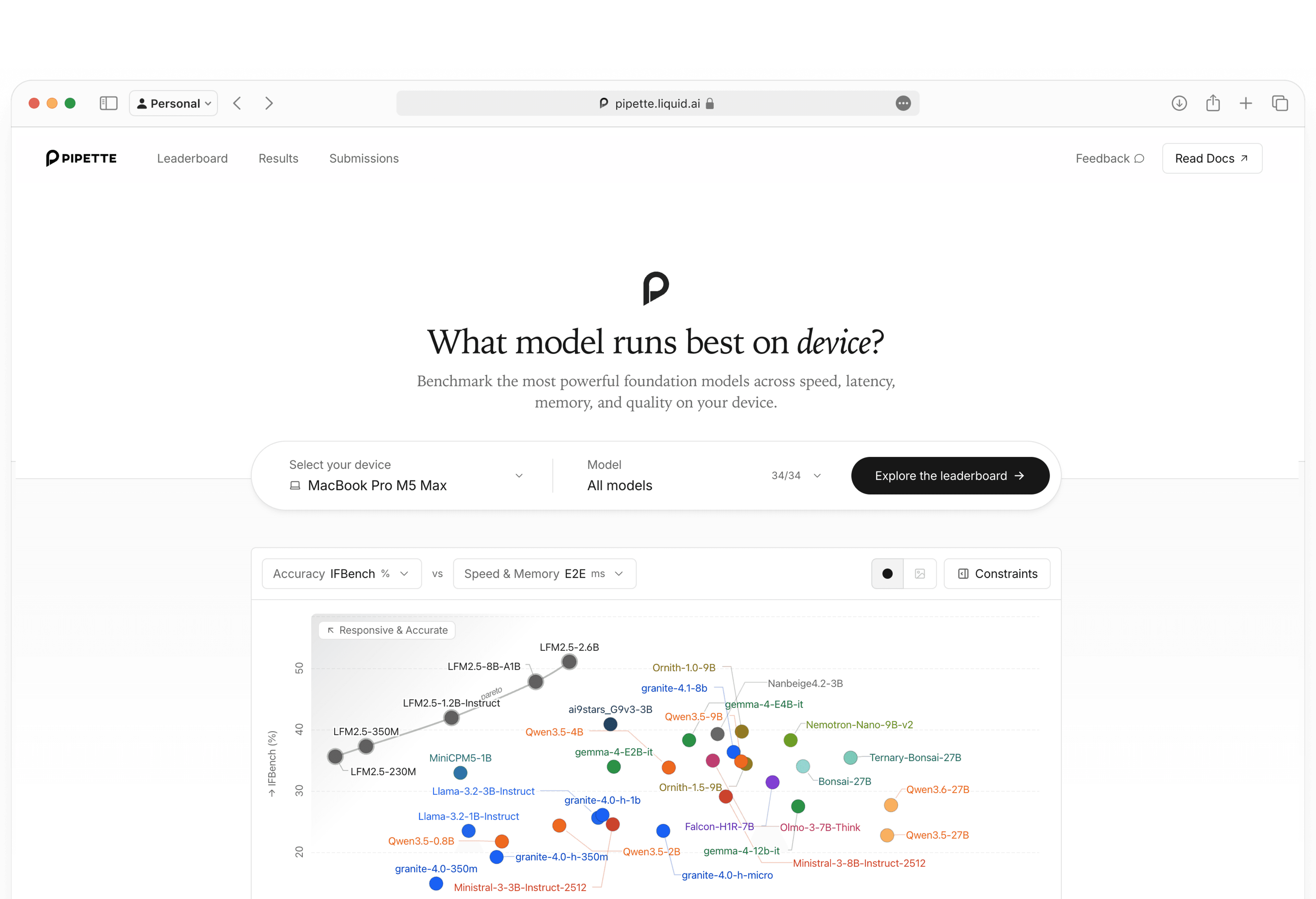
- An interactive dashboard for analyzing deployment configurations. It connects quality evaluations with measured throughput, latency, context scaling, and memory use on supported devices. More models are already in the pipeline.
- Artificial Analysis combines Pipette’s on-device performance data with equally weighted quality evaluations chosen to represent real-world mobile use.
- Apache 2.0-licensed infrastructure for operating the complete benchmark pipeline. The release includes pipette-mgmt, pipette-clients, and pipette-scores.
 Explore our leaderboard
 View clients on GitHub
 Explore the Artificial Analysis mobile benchmark resultsRequest your model, runtime, processor and device
Model releases commonly include capability scores produced under server-class, full-precision conditions. These results provide a useful baseline, but they do not necessarily predict how a model will behave in its intended deployment environment. On-device deployment introduces different constraints, including whether the model fits in memory, how quickly it responds, and how its runtime behaves on a specific processor.
Pipette addresses these questions with versioned benchmark definitions and published measurement protocols designed for reproducibility.
“Understanding the true performance of a device-scale model requires careful and simultaneous attention to many dimensions across capability, speed, latency, memory, runtime, and processor or device type. Most available benchmark suites do not capture this. Designing an unbiased and fair benchmarking suite for device-class models is not trivial, given the diversity of mobile devices outside data centers, runtimes, quantization profiles, device conditions, and benchmarking setups. This is why we decided to build Pipette, open-source it, and partner with Artificial Analysis, an independent expert validator to ensure the fairness and reproducibility of our methodology and results at scale.”
Why On-Device Benchmarks Need Deployment Context
Model cards typically report quality for the original full-precision weights, while on-device deployments often use quantized artifacts. Quantization can affect output quality, and the effect varies by model, format, and task. Pipette evaluates quantized artifacts on IFBench, GPQA Diamond, and MATH-500, with FP16 or BF16 results providing a reference where available. This reveals how much of the reference artifact’s evaluated capability is retained after quantization.
In Pipette, every measurement starts with a tested deployment configuration:
model + quantization + runtime + device
A benchmark then defines the metric and token shape to measure, producing a latency, throughput, or memory result for that configuration. Quality results are identified separately by model, quantization, evaluation version, thinking mode, and evaluation authority. The currently published quality scores come from llama.cpp evaluation runs on NVIDIA H100 80GB reference systems. These quality values are paired with compatible on-device performance measurements in the dashboard.
Cloud deployments can often add capacity or move a workload to larger or more specialized hardware. Small language models run on phones, laptops, and embedded devices, often customized, specialized, and quantized considerably to fit in memory. Runtime behavior, processor architecture, memory pressure, power state, and thermal headroom can therefore determine which configuration is viable.
The data shows how strongly these interactions can shape a deployment decision:
Two 350M models can scale very differently with context. At Q4_K_M on Galaxy S26 Ultra, Granite-4.0-H-350M retains 78.4% of its decode throughput from 256 to 4,096 input tokens, while Granite-4.0-350M retains only 33.8%. Compare Granite context scaling
Sparse activation can deliver small-model speed without small-model memory use. At 2,048 input tokens on Galaxy S26 Ultra, LFM2.5-8B-A1B decodes 2.4x faster than Qwen3.5-4B and 2.6x faster than Ministral-3B-Instruct-2512. Despite activating only 1.5B of its 8.5B parameters per token, it still peaks at 5.29 GiB because all expert weights contribute to the model’s memory requirements. Compare sparse and dense configurations
Two similarly sized iPhone models expose a direct speed-quality choice. At Q4_K_M, MiniCPM5-1B completes the workload with 2,048 input tokens and 256 output tokens in 3.47 seconds versus 4.12 seconds for LFM2.5-1.2B-Instruct, a 15.8% reduction in elapsed time. In a quality evaluation of the same Q4_K_M artifacts, LFM scores 9.0 points higher on MATH-500. Neither configuration dominates both axes. Open the iPhone Pareto comparison
Nearly identical 8B deployment profiles can hide a task-level reversal. At Q4_K_M and 2,048 input tokens on M5 Max, Granite-4.1-8B and Ministral-3-8B-Instruct-2512 differ by only 2.4% in decode throughput and 1.2% in peak RAM. In quality evaluations of the same Q4_K_M artifacts, Granite leads IFBench by 7.3 points while Ministral leads GPQA Diamond by 14.0 points. Compare performance and task quality
Pipette keeps these tradeoffs separate and inspectable rather than collapsing deployment readiness into a single ranking.
How Pipette Works
Pipette is designed around reproducibility and transparency. Performance benchmarks follow Pipette’s published measurement methodology: timing and memory runs use fixed token shapes, greedy decoding, a discarded warm-up, five measured repetitions, and readiness gating. Pipette’s methodology has been reviewed and verified by Artificial Analysis. Evaluations follow a separate published protocol using standard datasets, completion generation through a reference runner, and deterministic, model-blind scoring.
Three open-source components implement the pipeline:
- pipette-mgmt: serves the versioned benchmark catalog and ingests benchmark submissions.
- pipette-clients: runs benchmarks on target devices and generates evaluation completions.
- pipette-scores: provides evaluation prompts and scores completions without access to their generation provenance.
A client fetches versioned benchmark definitions from pipette-mgmt and runs inference on the target device. The client returns performance measurements directly to pipette-mgmt. Before each timed repetition, a platform-specific readiness check verifies acceptable thermal and load conditions. Pipette publishes results only for runs that pass this check. Power and cooling conditions for phones are documented in our device conditions methodology.
For evaluations, pipette-mgmt forwards the generated completions to pipette-scores for model-blind scoring, then stores the scores with their generation provenance. Each submission records the benchmark and token shape, model artifact and quantization, runtime version and settings, and the device hardware and operating system. Pipette uses this metadata to keep results from different conditions separate and make the basis of each comparison explicit. The documented scope and measurement boundaries clarify how the current results should be interpreted.
Inspect Pipette submissionsInside the Dashboard
The dashboard is organized around three complementary surfaces: a per-device Leaderboard for deployment decisions, a Results explorer for configuration-level tables, and a Submissions browser for the underlying records. Across these surfaces, users can narrow the data by model, quantization, runtime, device, benchmark, context length, and thinking mode where applicable.
Pareto frontiers under real constraints. Plot IFBench, GPQA Diamond, or MATH-500 against time to first token, end-to-end latency, prefill throughput, decode throughput, or peak RAM. Lines connect quantization variants of the same model, while the constraints panel filters results by minimum quality or throughput and maximum latency or memory.
Context scaling and quantization tradeoffs. Dedicated views group models by parameter tier, trace throughput and memory across context lengths from 256 to 8,192 tokens, and map speed against peak RAM. Quantization views compare each artifact’s evaluation score with its full-precision reference where available.
Traceability down to the raw record. The Results page lists each published model, quantization, device, and runtime configuration. The Submissions page exposes the records behind those results, including benchmark version, token shape, measured value, and standard deviation where applicable. A coverage explorer reports how many submissions are represented across runtimes, devices, quantizations, benchmarks, and models.
Shareable, documented, and versioned. Each chart on the Leaderboard generates a shareable link that preserves its filters. Our documentation covers the measurement methodology, benchmark definitions, evaluation protocols, and glossary. Our records retain the client and runtime versions needed to audit how each result was produced. For implementation details and setup instructions, see pipette-mgmt, pipette-clients, and pipette-scores on GitHub.
Limitations and Future Directions
Pipette is just getting started. Coverage is expanding through Liquid AI’s device lab, with community-contributed configurations planned as the submission workflow matures.
NPUs: NPU support depends on model-specific kernel and operator coverage. In this initial release, no NPU path supports enough of the published model set to provide consistent comparisons across model classes, so NPU results are not included. We are actively working to expand this coverage and welcome contributions from hardware and runtime partners.
Android GPU coverage: Under the current benchmark setup and model coverage, none of the stable GPU backends tested on Android consistently outperformed the selected CPU path across the full model set. The current llama.cpp Android path is therefore CPU-focused, while the iPhone path uses the Metal backend.
Comparison across devices: We do not currently recommend interpreting cross-device results as controlled hardware comparisons. Android and iOS runs differ in flash-attention support, thread counts, accelerator use, and execution environment. Android runs use a CPU-based CLI path, while iOS runs inside the app using Metal. Current Pipette results are most reliable for comparing configurations within the same device.
Quality evaluations for device-class applications: The current suite covers instruction following, science reasoning, and competition mathematics, but it is not comprehensive for agentic behavior, knowledge-intensive tasks, multimodal workloads, or other device-oriented use cases. For this release, Artificial Analysis reports the average of common evaluations chosen to represent real-world mobile use. We welcome feedback on which capabilities and benchmarks should be included to better represent on-device model quality.
Get Started
Explore the Pipette dashboard to compare models, quantizations, runtimes, and context lengths on the device you plan to target. Every filtered chart has a shareable URL, so individual deployment comparisons can be inspected and discussed directly.
Run Pipette on your own hardware using the open-source clients, the native iOS app, or the Android app. Publication of community-submitted results is currently in beta, and we encourage model providers, runtime developers, hardware teams, and application builders to help test the workflow.
If a model, runtime, device, or benchmark you need is missing, open an issue or contact Liquid AI to request coverage or share feedback. More configurations will be added as they complete the measurement and publication process.
Appendix
Pipette launches with the following models and quantization formats:
LFM2.5-230M: Q4_0, Q4_K_M, Q5_K_M, Q8_0. Hugging Face
LFM2.5-350M: Q4_0, Q4_K_M, Q5_K_M, Q8_0. Hugging Face
LFM2.5-1.2B-Instruct: Q4_0, Q4_K_M, Q5_K_M, Q8_0. Hugging Face
LFM2.5-2.6B: Q4_0, Q4_K_M, Q5_K_M, Q8_0. Hugging Face
LFM2.5-8B-A1B: Q4_0, Q4_K_M, Q5_K_M. Hugging Face
Qwen3.5-0.8B: Q4_0, Q4_K_M, Q5_K_M, Q8_0. Hugging Face
Qwen3.5-2B: Q4_0, Q4_K_M, Q5_K_M, Q8_0. Hugging Face
Qwen3.5-4B: Q4_0, Q4_K_M, Q5_K_M, Q8_0. Hugging Face
Qwen3.5-9B: Q4_K_M. Hugging Face
Qwen3.5-27B: IQ1_M. Hugging Face
Qwen3.6-27B: IQ1_M. Hugging Face
Gemma 4 E2B Instruct: Q4_0, Q4_K_M, Q5_K_M, Q8_0. Hugging Face
Gemma 4 E4B Instruct: Q4_0, Q4_K_M, Q5_K_M, Q8_0. Hugging Face
Gemma 4 12B Instruct: Q4_K_M. Hugging Face
Granite 4.0 350M: Q4_0, Q4_K_M, Q5_K_M, Q8_0. Hugging Face
Granite 4.0 H 350M: Q4_0, Q4_K_M, Q5_K_M, Q8_0. Hugging Face
Granite 4.0 H 1B: Q4_0, Q4_K_M, Q5_K_M, Q8_0. Hugging Face
Granite 4.0 H Micro: Q4_0, Q4_K_M, Q5_K_M, Q8_0. Hugging Face
Granite 4.1 8B: Q4_K_M. Hugging Face
Ministral 3 3B Instruct 2512: Q4_0, Q4_K_M, Q5_K_M, Q8_0. Q4_0 source. Q4_K_M, Q5_K_M, and Q8_0 source
Ministral 3 8B Instruct 2512: Q4_K_M. Hugging Face
Llama 3.2 1B Instruct: Q4_0, Q4_K_M, Q5_K_M, Q8_0. Hugging Face
Llama 3.2 3B Instruct: Q4_0, Q4_K_M, Q5_K_M, Q8_0. Hugging Face
Falcon-H1R-7B: Q4_K_M. Hugging Face
Olmo-3-7B-Think: Q4_K_M. Hugging Face
Ornith-1.0-9B: Q4_K_M. Hugging Face
Ornith-1.5-9B: Q4_K_M. Hugging Face
Nanbeige4.2-3B: Q4_K_M. Hugging Face
Ling-3.0-tiny: Q4_K_M. Hugging Face
MiniCPM5-1B: Q4_K_M. Hugging Face
NVIDIA Nemotron Nano 9B v2: Q4_K_M. Hugging Face
ai9stars G9v3 3B: Q4_K_M. Hugging Face
Bonsai-27B: Q1_0. Hugging Face
Ternary-Bonsai-27B: Q2_g64. Hugging Face